Thursday, August 28, 2008

RefWorks


RefWorks is a database provided by the Mildred F. Sawyer Library which allows the user to collect and organize references and access them from any Internet-connected computer. References or citations may be organized into folders according to topics, and they may be utilized to create a bibliography using MLA, APA, or other style format. RefWorks offers FAQs, Tutorial Basics, and a Quick Start Guide, in order to assist the new user in the most efficient use of its content.


Setting Up a RefWorks Account:

You must be on campus to sign up for a RefWorks account. Go to "Databases by Subject" from the Mildred F. Sawyer Library home page, and choose any of the first five broad subjects. RefWorks is listed under each subject. Click on "Sign up for an Individual Account." Follow the instructions for creating an individual account. You may choose your own username and password. After you have followed the sign-up procedure, you will receive a confirmation email which will include the Suffolk University Subscriber Group Code. You may need to use this code to access your RefWorks account from off campus.


Exporting Database Search Citations Directly into RefWorks:


After conducting a search and selecting citations, some databases allow the user to directly export these results into RefWorks. For example, if you are using the Academic OneFile database, you can export selected references (citations) directly into your RefWorks account, after saving them to a folder. Go to "Tools" and select "citation tools," choose the format (APA, MLA, etc.), and directly import the citation into your RefWorks account.

Many databases, such as Business Source Complete, JSTOR, Project Muse, PsycINFO, CQ Researcher, LexisNexis Academic, and others, allow the direct export of citations into RefWorks. Most require that selected citations be saved to the database folder first. For further information concerning direct export databases, see RefWorks Direct Export Partners.


Some Databases Require an Import Filter:

For those databases which are not direct export partners, RefWorks offers import filters for importing database search results into RefWorks. For the most comprehensive listing and instructions for use of imports, sign on to your account, select the Help tab, and choose "Getting References into Your Account." Instructions are detailed and quite helpful. In many cases, after completing a search, save the results as a text file. Choose the appropriate filter for the database that was used, and import the file.


Write-N-Cite:
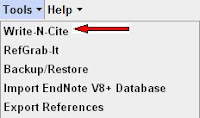


Write-N-Cite is a utility that formats in-text citations and bibliographies. The Write-N-Cite plug-in inserts tags for your citation into your document as you type. Once you have saved and named the document, you need only choose your ciation style and click Create. The formating is completed quickly. To use Write-N-Cite you must first download the Write-N-Cite utility from the Tools pull-down menu. This plug-in is compatable with both Windows and Macintosh applications.

RefWorks is an extremely useful database for student and faculty research. Take advantage of the tutorials and guides mentioned earlier, and expect a bit of a learning curve when first using RefWorks. Check out our new RefWorks Resource Guide.


[FIND RefWorks in our "Databases by Subject" List within any of the first five categories].


Monday, August 25, 2008

Database Alert: IE 7 Causes Scary Warnings and Blocked Connections

Library database access is a fairly sophisticated process involving several systems and applications working in harmony together. Unfortunately, some harmony is hard to achieve--especially with the constant changes with both databases and browsers. We have discovered some issues with database access related to Internet Explorer 7, the latest upgrade to the most popular web browser.

The problem appears related to IE7 balking when a library user tries to access a database through the proxy server--and all of our database run through the proxy. (The proxy server is the library tool that allows you to be authenticated as a Suffolk user and then allows you to be referred into the database, off- or on-campus.)

Since the "security certificate" of the database belongs to the database company, it doesn't include the parts of the URL (or web address/link) that sends the connection through the proxy. Therefore, IE7 throws up a "Danger, Will Robinson!" message that can either frighten the library user, or in some cases, actually interfere with your access to the database.

Right now, we know that this happens when JSTOR users try to access their MyJSTOR accounts. (In this case, you just get a scary warning.) It also happens in Country Commerce, where the warning screen actually interferes with your successful login to the database.

Here is the problem and how to solve it:

If I try to access Country Commerce using the standard installation version of Internet Explorer 7, I first get this scary screen, when it tries to connect:


IE7 thinks it is doing you a favor by telling you not to attempt to connect to the next page. If you click the Continue to this website (not recommended) option, in Country Commerce, the referral will fail and you will not get into the database. Instead, you'll reach the site, but it will demand that you "login." As in this screenshot:


Since we do not use database manual logins, you would not be able to access the database.

What you need to do, to not face this issue, is to tell IE7 that it doesn't need to worry about website security certificates and whether they seem to match.

To adjust this setting. Look at the top menu settings on your Internet Explorer 7 browser. Choose the Tools option

Then click on the bottom Internet Options

Click on the far right Advanced tab. And then scroll to the bottom

UNclick (remove the check mark) in the box that reads "Warn about certificate address mismatch."

Then click the Apply button at the bottom, and then the OK button at the bottom.

See, too, the starred note at this option. It indicates that this change will not go into effect until you restart (close and re-open) your IE7 browser.

This adjustment should allow you to turn off the scary warnings in some databases and avoid the interference that occurs in others.

We are in contact with our database vendors about this issue, but this is a work-around that will alleviate the problem, for now.

Friday, August 8, 2008

New Database: PsychiatryOnline


Sawyer Library has just added another specialized database--one that will be especially useful to psychology researchers. It is PsychiatryOnline, and it is a product of American Psychiatric Publishing, Inc. (APPI).

The APPI self-describes their aggregate as "a powerful web-based portal that features DSM-IV-TR®—the most widely used psychiatric reference in the world—and The American Journal of Psychiatry as the cornerstones of an unsurpassed collection of psychiatric references from American Psychiatric Publishing."

A key selling point is the easy access to the key diagnostic reference set, the DSM® Library. Titles including DSM-IV-TR, DSM-IV-TR Handbook of Differential Diagnosis, and DSM-IV-TR Casebook and its Treatment Companion.

The database also includes several valuable journals, including the American Journal of Psychiatry and the Journal of Neuropsychiatry and Clinical Neurosciences. Five peer-reviewed psychiatry journals are in the set, with ten years of backfile. (Be advised that some "deep" backfile issues are not available as part of this database.)

Respected "textbooks" (of the reference variety) are also available on the platform. These include The American Psychiatric Publishing Textbook of Psychiatry, Gabbard’s Treatments of Psychiatric Disorders and Essentials of Clinical Psychopharmacology.

PsychiatryOnline does not work that well as a searchable database. Instead of allowing a simple keyword or boolean word combination search the way most databases do, it wants your research to match PsychiatryOnline's own controlled vocabulary, or "index entries." This can be inconvenient, but does work. When you click on a subject term, it will default to giving you book content. But in the grey frame to the left, you will see a link to Journal Results.

This is often a large number of results, since the subject terms are broad. You can limit the term to the title or title and abstract of articles using radio buttons below. Or you can limit to specific APPI journals, or limit for date (perhaps only articles published in the last two years).

They describe their quirky search engine at this link.

The good news is that PsychiatryOnline is less about having a searchable database than it is having reliable electronic access--24/7 for anyone with a valid, current Suffolk ID--to several key psychiatry resources. We hope that you find this content useful.

[FIND The PsychiatryOnline on our "Databases by Subject" List in the "
Social Sciences" category.]

Monday, July 28, 2008

Online Catalog vs. E-book Collections

Database Use Tip: Multiple options when searching for books: The Online Catalog vs. Collections of Electronic Books (with special attention to Ebrary).

Suffolk University's Library Catalog is the key to the print circulating and reference collections for the Mildred F. Sawyer Library (including the Madrid and Dakar campuses), the Moakley Law Library, and the NESADSU Library.


The general circulating collection of the Sawyer Library includes more than 100,000 print volumes shelved in the stacks on the 4th floor. The Catalog - which is THE tool to identify and locate these items - is accessible from the Sawyer Library homepage and from the Sawyer Library computer workstations by a shortcut labeled "OPAC" (Online Public Access Catalog).


The catalog also provides access to the Sawyer Library's collections of electronic books, or E-books, which together comprise more than 50,000 titles. The Catalog is the only tool that will simultaneously search the print titles and all the E-book collections. E-books may be searched through the Catalog in the same way as print materials (title, author, subject heading, keyword combination), and most keyword searches will bring a set of results that is a mix of print and E-book sources. However, unlike print items which are physically present in the library, the content of E-books is accessed through a link on the catalog record. All of the titles in all of the various E-book collections that the Sawyer Library subscribes to may be accessed through the Library's Catalog. Catalog users may also limit their results to either print materials or E-book materials by choosing "Modify Search" once the initial search results are returned. In rare occasions the Sawyer Library may own a title both in print and in electronic format, however this is the exception, and not the rule.

Users may directly access and search the individual E-book collections from the Sawyer Library homepage by choosing Databases by Subject, and then E-books. Each of the collections will behave somewhat differently, but all of them will let the user search for a term anywhere in the content of the book.


The feature of being able to search anywhere in the content of a book is the primary distinction between the Library Catalog and the various E-book collections. A keyword search in the Catalog will look for the search term in the title, subject headings, author names, and in some instances the book's table of contents. The Catalog does not search the text of the books. Each E-book collection has the ablility to search the full text of its entire book collection. In the case of Ebrary, users must go to the advanced search to specify that the term appear either in the book's title, subject headings, or author's name.

Advantages and Disadvantages:

The Catalog will search accross all book collections that the Suffolk Libraries own or have access to, but search of the full text of the items is not possible. The E-book collections allow a search of the full text, but each collection must be searched individually, and even though results are ranked by relevancy, the term may only be mentioned one or two times in the entire book.

Example:


A keyword search for "klezmer" (traditional Yiddish or Jewish folk music from Eastern Europe) in the Catalog yields 3 results: One promising title, "American Klezmer its Roots and Offshoots" (which happens to be an Ebrary book), and two false hits where the Author's surname is Klezmer.


A simple search in Ebrary (one of the larger E-book collections), for "klezmer" yields 104 results. The first three titles ("American Klezmer : Its Roots and Offshoots," "Anglish Yinglish: Yiddish in American Life & Literature," and "Performing Ethnomusicology : Teaching and Representation in World Music Ensembles") provide a good amount of information on klezmer, but many of the remaining 101 titles only mention the term briefly.

Notes on Ebrary:

On Campus, users will have immediate access to Ebrary and all other Ebook collections (either from a link in the Catalog to a specific book, or from the list of databases) without any ID verification. Off campus, users will be prompted for their name and their Suffolk University ID number. Within Ebrary, users have the option to "Sign In" and create an account. Signing in allows the use of Ebrary features such as creating a personal bookshelf, highlighting text, and adding one's own notes. It is not necessary to sign in to view Ebrary books, even though there will be a button on the screen stating "not signed in." The Ebrary "Help" feature steps through the brief process of signing in and creating a bookshelf, and the privacy statement (available at the point of creating an account) explains Ebrary's policies regarding the information they collect from users.

Friday, July 25, 2008

New Database: Philosopher's Index

Sawyer Library is happy to add Philosopher's Index to our array of available databases to serve the research needs of the Suffolk community. It is produced by the Philosophers Information Center and is the most current and comprehensive bibliographic database covering scholarly research in all major fields of philosophy.

Entries include author-written abstracts and the database content covers all areas of scholarly research published in journals and books, including contributions to anthologies and book reviews. It includes materials published since 1940 within the fifteen fields of philosophy: aesthetics, axiology, philosophy of education, epistemology, ethics, philosophy of history, philosophy of language, logic, metaphysics, philosophical anthropology, metaphilosophy, political philosophy, philosophy of science, social philosophy, and the philosophy of religion. The database indexes 570 journals from 43 countries with content representing a variety of languages.

Since it is a "bibliographic database," it provides citations and summaries, but no full-text. But the good news is that we provide this database on the EbscoHost platform (which just made it available to their clients). Therefore, we are able to seamlessly link to all kinds of journal articles that appear in Ebsco databases like Academic Search Complete and Humanities International Complete, as well as to journals we subscribe to or which are available through JSTOR. And you will also spot, below results items, additional links to the online catalog and to our eJournal Locator, which will allow you to locate even more articles that we own in additional electronic, paper, and microform formats.

For example, if I do a quick (and clearly, not very precise) keyword search for Descartes, I get almost 5000 entries. If I choose the "limit your results" option in the right frame, and restrict my results to those with "Linked Full Text," I still get over 200 items to which Ebsco can directly link.

Keep in mind that these are only the items that Ebsco can pull directly from their own files. Many of those other 4800 items would also be available, but I would need to click the "360 Link to Full Text" or "Check Library Catalog" links beneath an interesting results entry to explore these options.

If you are doing research into philosophy or even researching ethical issues related to other fields like stem cell research or corporate responsibility, the Philosopher's Index might provide useful leads for your research.

[FIND The Philosopher's Index on our "Databases by Subject" List in the "Literature, Arts and Humanities" category.]

Friday, June 20, 2008

Database Alert: Blackwell Synergy Shutting Down and Merging with Wiley InterScience


Library Users, please be aware that Blackwell Synergy, the home of over 1 million articles from over 850 journals, will cease to exist within the week. However, all is not lost. As of June 30th 2008, all journal content on Blackwell Synergy merges into Wiley InterScience, which is another of our publisher aggregate databases.

Already, access to some components of the Blackwell Synergy product have become unreliable or unavailable. (I can testify to this as the keeper of the library usage statistics!) Officially, it is over the weekend of June 28th and 29th, 2008 that there will be a period when both Blackwell Synergy and Wiley InterScience will be unavailable while the company "transitions and re-indexes data." Then, after July 1, 2008, Blackwell Synergy will no longer be available online, but the content therein should be available via Wiley InterScience, and any existing Blackwell links are supposed to relay to Wiley.


Still, be warned, the transition--starting now--may not be as smooth as the publisher hopes.

Putting a positive spin on this upheaval, the merger will make some 3 million journal articles in over 1400 journals available on a single site. Blackwell journal content will be searchable on Wiley InterScience, and listed under appropriately enhanced subject categories. Wiley claims that "this is a first step in the development of a next generation online publishing platform, arriving early 2009, which will deliver Wiley-Blackwell journals, online books, reference works, databases, protocols and other electronic resources through one integrated service."

More info and an FAQ are available at http://0-interscience.wiley.com.library.law.suffolk.edu/transition

For those who despair over all the mergers and changes in the world of publishing, journals, and databases, my best advice is to get used to it! Merger mania and rapidly changing delivery platforms are now the norm.

Here at the Sawyer Library, we will do our very best to stay on top of these changes and keep our library users informed about any change that will impact them and their research practices.

Tuesday, June 17, 2008

New Database: The New Palgrave Dictionary of Economics


We have recently added a new online edition of one of the classic reference texts in the field of economics. This is The New Palgrave Dictionary of Economics. The first edition, called The Dictionary of Political Economy, was edited by Robert Harry Inglis Palgrave, and published in three volumes, the first of which was printed in 1894. Several revising editions appeared in the more than 100 years since.

The current New Palgrave Dictionary of Economics contains articles by 1,506 contributors, including 25 Nobel Laureates in Economics. It includes 1,872 articles: 1,057 of these are new to the second edition; 550 are edited original articles; 157 are revised articles; 80 are ‘classics’; and 28 are ‘signpost’ articles. For those, like me, who do not want to "do the math," this supposedly means that over 70% of this edition’s articles are either new or heavily revised.

New or expanded areas include: experimental and behavioural economics, game theory, international economics and technological change and growth. Topics are placed in their historical perspective, indicating likely future trends as well as describing the contemporary situation.

With online access, current Suffolk students and faculty will be able to search and browse the content of this important reference work 24/7, from wherever they have an internet connection.

We also purchased the 8 volume print edition, which will please those who prefer the tactile pleasures of the physical book. However, the online edition has another key advantage. It will be regularly updated with new articles, updates to existing articles, and new features and functionality. The first updates are due to go live at the end of August.

That first online update is scheduled to include the following articles: "Patent Pools" by Daniel Quint; "Thin Markets" by Marzena Rostek and Marek Weretka; "Stigma" by Steven N. Durlauf and Lawrence E. Blume; "Cross-Country Growth Regressions" also by Durlauf and Blume; and there will also be 20 selected biographies of key economists in that load.

Like the Blackwell Encyclopedia of Sociology, the New Palgrave Dictionary of Economics does not have the most elegant or attractive interface. Still, it is a functional one, with the ability to search for keyword concepts from the box in the upper right, or browse A-Z alphabetical entries.

If you would like to consult a brief introduction to this online resource, prepared by the publisher, take a look at their Flash Tour.

And while you are exploring the Palgrave, also take a look at our re-configured Databases by Subject/E-Books page, which now includes not only large collections of eBooks, but also a list of multi-volume single-title reference sources worth exploring.

[FIND The New Palgrave Dictionary of Economics on our "Databases by Subject" List in the "E-Books" category.]