Friday, June 4, 2010

Notable Ebooks: Who's Buying Series

Finding marketing demographics in a well-organized and tidy form is sometimes a challenge. Although we do have entire databases devoted to demographics, like DemographicsNow, and others that try to collect data on consumption of products in the global community, like Euromonitor's Global Market Information Database (GMID), the fact is that both of these databases have quite a learning curve. And a bit of patience is required to use them effectively. Sometimes, people just want a quick demographics snapshot of this or that, which is why the print resources published by New Strategist have been popular resources with our users since before either of the above mentioned databases existed.

New Strategist publications look at everything from public opinion (American Attitudes) to Household Spending to characteristics of specific generations (e.g., The Millennials). And a few years ago, the company started a "Who's Buying" series of small volumes covering a variety of market segments like apparel, health care, travel and pets. We used to have these volumes only in print form, with the latest editions kept at the Reference Desk. But we recently added several New Strategist publications, including the Who's Buying Series as eBooks in our Gale Virtual Reference Library (GVRL) collection, thus extending where and how our users can access these materials.

You can, of course, simply go to GVRL as a database and plug in a topic. If, for example, I search for fast food restaurants, I'll pull up a great variety of materials. These include industry histories, biographies of business leaders like Dave Thomas (of Wendy's fame) AND sections pulled out of the Who's Buying at Restaurants and Carry-Outs.

In many cases, you'll want to see these other GVRL resources, as well.

However, if you only want the specific Who's Buying guide, one option is to look up the individual volume, like the Pets guide, in the online catalog,


and click on the link to the online version, and then either use the search box to left of the opening eBook screen to search "within this publication" or browse the "eTable of Contents" linked in the middle of the page.

And if you don't know the name of a particular book in the series, simply browse the titles in this series list from the online catalog. (The other option would be to pick to the individual titles from the "Social Science" (!) list on the GVRL opening screen, but this is not the best or easiest way of getting to these volumes.)

As handy as these little guides can be, don't forget to use the other databases we have, which may provide you with more up-to-date or varied information. Besides the ones mentioned in the first paragraph or this blog entry, there are many more linked from our subject database lists and from our many research guides, including ones on marketing and demography.

Friday, May 28, 2010

New Database: Health Policy Reference Center

In the past year, many people outside of the governmental and health fields have spent a lot of time thinking about, discussing, and even hotly debating health care policy in this country. The passage of The Patient Protection and Affordable Care Act (PPACA) this spring has slowed the debate, but has certainly not ended the discussion. And here at Suffolk, we have several programs (like the SBS Healthcare Administration graduate programs and the CAS Center for Women’s Health and Human Rights and Master of Arts degree in Women’s Health ) that are very concerned about the multiplicity of issues related to health and public policy.

For this reason, and many others, Sawyer Library has recently added a brand new database from EbscoHost called Health Policy Reference Center. Ebsco calls this file "a comprehensive full-text database covering all aspects of health policy and related issues. This collection offers unmatched full-text coverage of information relevant to many areas that are integral to health policy." Areas covered include everything from Health Care Administration to Public Health to Maternal & Child Health to Health Care Financing & Economics. The database features over 300 full-text titles, indexing many more, with coverage not only of scholarly journal literature but also selected monographs, magazines, and trade publications. And, because this is an Ebsco database, it soft-links to many additional full-text sources in affiliated Ebsco databases, and also links to articles outside of Ebsco files using our Serial Solutions 360 Article Linker (look for the green dot below results entries).


As with all EbscoHost databases, it is simple to refine a large results list from a broad search by narrowing by Subject:Thesaurus Term and/or Source Type in the left frame. Or limit to Scholarly (Peer Reviewed) literature by clicking the box in the right frame. Be very cautious about limiting to "Full Text" in the right frame, however, because this will eliminate many useful articles that you can link to by simply clicking that

Researchers interested in health policy will want to utilize a variety of other online databases besides this quite specialized one. MedLine with Full Text and Wiley InterScience are two examples of additional resources worth exploring. Others are detailed in our research guides for Health Administration and Medicine. And undergraduates looking for basic overviews on the Health Policy debates might find databases like CQ Researcher and Opposing Viewpoints Resource Center useful, too.

[FIND Health Policy Reference Center on the "Databases by Subject" Lists for both Social Sciences (first column) and Business and Management List (second column). ]

Friday, May 21, 2010

Fresh Technologies: Digital Microfilm

With the possible exception of the admirable Sonia of our Reference team, most people really hate dealing with microfilm. Being forced to schlep into the library, find a reel, spool it to the right spot, and then straining to read it or line up a proper copy image, is considered a major hassle. That's one of the reasons that Sawyer Library has--for many years--provided free microfilm copying. Your suffering does not include additional expense at this particular library when it comes to using microfilm or microfiche.

However, here is some good news: The major purveyor and producer of microfilm serials in this country, ProQuest (formerly UMI), has just released a new online means of providing digital images of newspapers and journals and they call it Digital Microfilm.

The major advantage to Digital Microfilm is that, like our other online resources, it is available to Suffolk users 24/7 from wherever you have an internet connection. We currently have three titles available on digital microfilm--Barron's, Wall Street Journal, and the Boston Globe. As you can tell from the OPAC pages that I've linked to, these are publications that we often have in a multiplicity of formats. But although the article content for, say, the Globe, might be available in databases like Massachusetts Newsstand, if you wanted to see advertising, illustrations and the like, you'd need an actual image and not just an html reproduction of the fulltext. This is the type of thing that our digital microfilm will be good at providing.

This cover-to-cover digital image becomes even more important for those who want to see, for example, the stock and other security pricing provided in tables of the Wall Street Journal, since the ProQuest current database for the WSJ doesn't include anything but article text, while the "Historical Newspapers" coverage only comes as far as 1992!

So, Digital Microfilm (which we have 2008 to date) will fill in some coverage gaps for those needing the actual image of the publication in question.

To use the digital microfilm, first click on the link from the online catalog entry for your publication. This will bring you to a plain page that relays you to our account (click the link if the connection is not automatically made).

The interface is still a bit clunky, so the next step is to click the blue word link to Select the publication you want. Another widow will open to the side with the three papers listed. Pick the one you are looking for. The publication name will move to the search form, then select the year, month and day.

As I've indicated, this interface is still a work in progress. I have found that as you step through the year/month/day process, you may get ahead of the product, so do this slowly. And the digital reader seems to disappear when you minimize the imaging tool to work in another window. Although printing is easy to do, since the original page is usually a large one, you may have to change the print specs or use a magnifier on the small page image when you print! Experiment with adjustable aspects like brightness, contrast, and magnification to get an image that works for you. Consult the help guide for more assistance.

Another shortfall of the product is that it is slow to be produced. People expect digital products to be instant gratification, but there is a two to five month delay in the date-load of these publications. And the biggest downside to digital microfilm is that it is really not a "database." There is no keyword or other search mechanism in the Reader. (The PDF form has a search box but it does not work, so do not think that a "No Matches" result means your word string isn't in the paper.) This really is like a (dumb) microfilm reader in cyberspace. So come to the microfilm with a citation, or be willing to scroll through the thumbnails and pages to get to what you want.

I don't want to "bad-mouth" this breakthrough too much. For most people it will be a tremendous improvement in convenience and ease of use over the traditional reel storage material. So take advantage of Digital Microfilm when the need arises.

Thursday, May 13, 2010

Databases Worth Exploring: ACM Digital Library


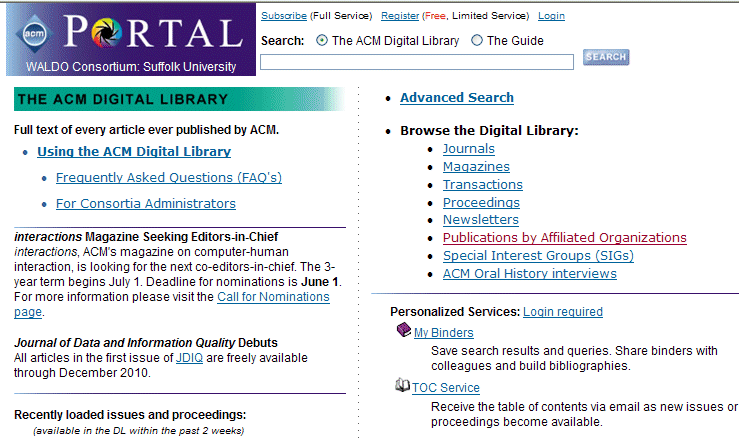
The Association for Computing Machinery (ACM), one of the world's largest educational and scientific computing societies, provides resources that advance computing as a science and profession. The ACM Digital Library Portal is a searchable, full-text repository of papers from publications that have been published or co-published by ACM and other publishers.

This Portal maintains two specific segments:

  • The ACM Digital Library with full-text publications


  • The Guide to Computing Literature-----The Guide is a bibliographic database containing citations and abstracts from ACM articles and proceedings, and holds more than 600,000 citations to titles published by various publishers. References to ACM publications are linked to the full-text.


  • All search results include the DOI, as well as Bibliometrics (how many downloads and how many times cited).


    The Institute of Electric and Electronic Engineers (IEEE) Computer Society is one of the world’s leading organizations of computing professionals. The IEEE Computer Society Digital Library provides online access to over 27 Society journals, magazines, and transactions from the 1960s to present and over 1,200 selected conference proceedings.


    ACM data exchange allows searches across both collections. ACM abstract references link to IEEE Computer Society, IEEE and ACM digital library content. Two Sawyer Library databases, therefore, serve the research needs of computer professionals and Information Technology students - IEEE Digital Library & ACM Digital Library. These databases are not new, but they are quality resources. For further assistance in the use of these databases, see IEEE Digital Library and ACM Digital Library Database Tips.


    [FIND the IEEE Digital Library and the ACM Digital Library on the "Databases by Subject" List for Sciences, on the second column. ]

    Friday, May 7, 2010

    Notable E-Books--TimesReference from CQ Press

    We have had CQ Political Reference Suite (CQPRS) for quite a few years. It is a useful collection of materials in topics related to government and public policy that you can search singly or together. Some of the most useful components are the Political Handbook of the World, which profiles the political environment of individual countries. (Lengthy profiles even include topics like national ommunications, providing the names, circulation, and political affiliation of major national media with information on news agencies, television coverage and internet usage.) And another personal favorite in the CQPRS is Historic Documents. This annual compilation (that goes back to 1972) provides scores of primary documents related to global events for a particular year. Materials reproduced include anything from presidential speeches to international agreements to reports on social issues like the effects of television violence.

    This spring we added several new reference materials to CQPRS. These include an Encyclopedia of Politics and Religion, an Encyclopedia of the First Amendment, and a resource on International Military Alliances 1648-2009.

    And for those who are interested in political history through the lens of major news coverage, we also added a set of four eReference books that are collected under the umbrella title of TimesReference.

    These "volumes" provide actual news articles, editorials, cartoons and photos from America's most respected newspaper, the New York Times.

    TimesReference includes four components, all of which combine contemporary political analysis with reproductions of newspaper content from the time. The first title in the series is The New York Times on the Presidency, which excerpts nearly 150 years of New York Times’ reporting "to explore the dynamic nature of the presidency in the American political system." Editor/author Meena Bose has "selectively chosen a variety of news articles, editorials, and data from The Times for which she has written context-providing narrative that discusses the key issues, leadership challenges, and turning points in each president’s administration, from Franklin Pierce (1853-1857) through George W. Bush (2001-2008)."

    The second entry is The New York Times on the Supreme Court, which "uses carefully chosen articles from The Times to explore the history and influence of the Supreme Court. Author Kenneth Jost provides expert analysis and presents selected news stories, letters to the editor, and Op Ed essays from the paper to look at the development of the Court and its relationship to the other branches of government and to the states."

    The third volume in the series, The New York Times on Emerging Democracies, "chronicles the peaceful transitions from Soviet or authoritarian order that have occurred over the last thirty years in Europe and Eurasia" in countries like Poland, Czechoslovakia and East Germany. Organized in country chapters, the work details the social change in the region, providing overviews, quick facts, analysis and lots of NYT content.

    The New York Times on Critical Elections is the latest installment. And it covers everything from the presidency of Abraham Lincoln to the election of Barack Obama.


    Reference resources like these really help to put history into the context of the time (and Times). These works can be useful for researching a wide variety of topics. And they are even fun to browse to get a sense of how the country and world have changed during the more than 150 years that the New York Times has been publishing.

    And keep in mind that these eBooks provide only a sampling of New York Times content. If you are interested in reading the paper online and don't want to deal with their corporate website, which gives away only limited amounts of material, don't forget that Sawyer Library has the Times in a wide variety of formats and databases. Most of the online versions don't go further back than the 1980's. However, we also have an online archive of the paper, through ProQuest Historical Newspapers, that reproduces a digital image of the paper, cover to cover, all the way back to 1851. (The advertising, alone, can be a real eye-opener!)

    I hope that you find the TimesReference and all of CQ Political Reference Suite useful. And if you really want to get the maximum CQ effect, you can even research your political topic or hot-button public policy issue in the consolidated CQ Press Electronic Library platform. This search box not only covers the CQPRS resources but also throws in our CQ electronic serials, CQ Weekly and CQ Researcher and even a separate database called CQ Press Congress Collection for good measure!

    Friday, April 23, 2010

    Recurring Reference Questions: How Do I Get Harvard Business Review Articles?

    The details of the question vary slightly. It might be "My teacher wants me to read this particular article...how do I find it?" or "My professor says my paper must include at least one article on the topic from Harvard Business Review (HBR), how do I do that?" but we definitely get a lot of reference questions about how to locate articles in this very well known scholarly business journal.

    Occasionally, misguided students (or faculty) who are used to Googling for everything--always a dangerous proposition!--end up at the website for the HBR and think they need to buy access to articles. If you are a current student or faculty member at Suffolk, there is ABSOLUTELY NO REASON TO DO THIS! We at Sawyer Library subscribe to the definitive Business Source Complete (BSC) database, which includes HBR back to 1922, and pay an extra hefty fee besides, to ensure that our community has full research and classroom use of this essential journal.

    So, let's review how to access the HBR and find things in it. As with most things, more than one approach will work. First, checking for the title (of the journal, not the article) in the online catalog, is always a valid starting point. The catalog record will tell you ALL your access options, including paper and microform.

    Still, most people want online! So here are a couple of easy ways to go for electronic access. Since I have already told you that HBR is in BSC, you could go directly to Business Source Complete, and when you get to the opening search screen, you can enter author, article title or topic keywords (using your boolean operator and in between) and put the term harvard business review in the publication box below and slightly to the right. Here is an illustration:

    But often the easiest approach to identifying, searching, and retrieving materials in an electronic journal, starts with our library homepage. Look for the eJournals search tab in the "Search Library Resources" box. Put in your title. (And, remember, hbr is an abbreviation, so you must spell out harvard business review, although there is no need to capitalize letters.)


    When you hit enter or click the arrow, our Serials Solutions service will check for the journal and tell you that although HBR is available in several databases, only BSC has both the older issues and the current ones. Click the link for Business Source Complete and you will go to a database page detailing that journal. If you have a citation (year, volume, issue, pagination), you can, if you like, simply click the year, then issue, then article that you want. (This will get you there, but often takes a bit of clicking and browsing.) I prefer--whether I am looking for a topic or a specific article--to click the link for Search within this publication above the "All Issues" list of years. This sets up a base search for Harvard Business Review as a journal. You would then add keywords to search for a specific article or topic.

    For example, let's say your professor says that you must read the article "Transforming Giants" by Rosabeth Moss Kanter. After we click the "Search within this publication" link we can add and transforming giants and kanter to the search box to perform a boolean operation to add these additional concepts. The database then identifies the one article in HBR that also contains the phrase transforming giants and the word kanter. See:


    This is a relatively quick and easy way to find an article. And a similar technique could be used to search for keywords of your choosing that appear in the journal. And, of course, you can use this method with just about any journal that you verify through the eJournal Locator. Although the screen will vary from database to database, almost all links in the eJournal Locator will take you to a screen that provides an option for searching within that particular journal for additional keyword concepts.

    Monday, April 12, 2010

    Link of the Week: The Economic Census

    Most people are familiar with the U.S. Census, which is supposed to count every U.S. resident and is conducted every 10 years. (2010 is a census year - so if you have not returned your census form yet, here is what your community stands to gain by having a high participation rate.)

    However, the Census Bureau also conducts an Economic Census. This is done every 5 years, the most recent one being from 2007. The data collected provides a detailed snapshot of the U.S. economy, by counting the number of establishments nationwide, their sales, their annual payroll, and the number of their employees. The Census Bureau then assigns each establishment to a specific industry, according to the North American Industry Classification System (NAICS). The 2007 NAICS is comprised of 1,175 industries grouped into 20 sectors, and by means of the Economic Census, these industries can in turn be viewed from the national to the local level.

    Why would someone who is not a government official be interested in such things? The statistics can provide a tool to identifying business markets and competition. Comparing changes from one census to the next can illustrate trends in industries by location (or for that matter, trends in different locations by industry).

    It takes some time before the Economic Census data is compiled and released. This is done in stages, and the bulk of the data sets are available 2-3 years after the census is conducted.

    Not surprisingly, finding and using the data effectively can be a challenge, but there are tools available to help.

    One is a reference book held by the Sawyer Library: Industry Research Using the Economic Census : How to Find It, How to Use It, by Jennifer C. Boettcher and Leonard M. Gaines.

    Other tools come from the Census Bureau itself, which has posted a User Guide and instruction materials (Power Point slides and handouts) from conference lectures held around the country. The instruction materials and included exercises are especially helpful, since they provide an insight into the types of queries the Economic Census can answer.