Tuesday, December 23, 2008

Notable E-Book: International Encyclopedia of Communication


Sawyer Library has recently added and electronic version of an impressive new encyclopedia called the International Encyclopedia of Communication.

Jointly published by Wiley-Blackwell and the International Communication Association (ICA), it represents, according to the publisher, "the definitive reference work in this interdisciplinary and dynamic field." This electronic resource is the equivalent of a 12-volume set containing 1,339 newly-commissioned A-Z entries, divided into 29 editorial areas representing major fields of inquiry, each of which is headed by a leading expert in their respective field. Spanning the breadth of communication studies, entries cover major theories, media and communication phenomena, research methods, problems, concepts, and geographical areas. Entries range from extended explorations of major topics to short descriptions of key concepts.

The International Encyclopedia of Communication was written and edited by an international team of well-respected scholars and teachers, representing the international character of the ICA. Editorial areas include: communication theory and philosophy, interpersonal communication, journalism, intercultural and intergroup communication, media effects, strategic communication/PR, communication and media law and policy, media systems in the world, and communication and technology.

There are multiple ways to use the online version. You may click on the "Explore" option in the upper border to see various subjects, places, periods, people or key topics to browse through. Or you can simply use the search box in the upper right.
If, for example, I search for the term dissonance, I get forty results (listed to the right), ranked for relevance. These start with "Cognitive Dissonance Theory," which is followed shortly thereafter by an entry on "Leon Festinger." Or I can explore other related subjects, topics, and so forth, from the offered options in the colorful left frame.

The ICA hopes that "this unique and inclusive work will strengthen the identity of the growing field of communication studies, support its institutions, and most of all, improve the study of communication problems and phenomena worldwide." And we here at Sawyer Library hope that the Suffolk community finds this a useful online reference source.

[FIND the International Encyclopedia of Communication by searching the title in our Online Catalog or through the link in Databases by Subject, E-Books category.]

Tuesday, November 25, 2008

Recurring Reference Questions: What is a Journal's Impact Factor, and How Can I Find It?


An Impact Factor (IF) provides a quantitative assessment of a journal's influence or impact. Thomson Scientific (now Thomson Reuters Scientific) offers the Impact Factor via Journal Citation Reports (JCR). According to Thomson Reuters, the Journal Impact Factor is the frequency with which the “average article” in a journal has been cited in a particular year. A journal’s Impact Factor is determined by dividing the number of citations in the JCR year by the total number of articles published in the two previous years. A Journal Impact Factor of 4.0 means that, on average, the articles published in that journal within the past three years have been cited four times. There must be at least two years of data in order to calculate the Impact Factor.

Using Impact Factors (IF) Wisely:


As Thomson Reuters indicates on their Information About page, one should not depend entirely on JCR data to evaluate a journal because:


  • IF only includes journals indexed by Thomson Reuters Scientific (ISI).


  • IF does not evaluate individual researchers.


  • Journals can only be compared within the same discipline. Citation results vary widely across disciplines.


  • The number of articles found in journals include both research and review articles. "Citation counts in JCR do not distinguish between citations to letters, reviews, or original research articles, even though only original research and review articles are used in IF calculations."


  • Title changes or changes in format of a journal affects the IF.


  • Some Additional Methods for Constructing Impact Factors:


    Google Scholar - From the Advanced Search screen, enter author and title information to obtain cited references. Publish or Perish may be used to track an author's impact using Google Scholar.

    eigenfactor.org - Ranking and Mapping Scientific Journals

    Journal Ranking - Center for Journal Ranking (CJR)


    To Find Journal Citation Reports:

    Go to the Mildred F. Sawyer's home page, and select "Databases by Subject." Choose "Business and Management" or "Social Sciences" and click on Journal Citation Reports in the list.


    To Utilyze JCR:


  • From the opening screen, select an option.


  • View journals by Subject, Publisher, Country/Territory. The default option is subject categorySearch for a specific journal.


  • Search for a specific title.


  • View all journals in the JCR edition and year you selected. (The Sawyer Library has the Social Sciences edition from 1998 forward).


    For example, if searching by Subject Category, select the subject from the second screen, and choose data sorted by journal title, total cites, impact factor, or other options provided from the drop-down menu. Use the Information for New Users button for more detailed information and instructions.


    [FIND Journal Citation Reports in our "Databases by Subject" Lists for Business and Management and for Social Sciences]


    • Wednesday, November 5, 2008

      Notable Ebook - Encyclopedia of Latin American History and Culture


      We are happy to offer a new edition of a valuable 6 volume encyclopedia, via our easy-to-use electronic reference platform, Gale Virtual Reference Library. The set is the Encyclopedia of Latin American History and Culture (2008). This new edition adds nearly 600 entirely new topics over the award-winning first edition of 1996. It also replaces some 150 obsolete entries and provides substantial revisions to hundreds more. According to the publisher, Scribner's/Gale, Every one of the 5,700+ entries "has been reviewed for currency of content and bibliography. An entirely new illustration program features over 100 full-color photographs in addition to hundreds in black-and-white. National statistics have been conveniently tabulated for every one of Latin America's 37 countries. New content addresses research on prehistoric environments and cultures, U.S. Haitian interventions, the consequences of NAFTA and increased Mexican immigration, the troubled aftermaths of Pinochet's Chile and Fujimori's Peru, truth and reconciliation commissions, and the still-contested legacy of the Mexico City massacre of 1968. New leaders like Brazil's Lula da Silva and Venezuela's Hugo Chávez are profiled along with hundreds of other rising figures in politics, letters, and the arts. Newly commissioned master essays synthesize current knowledge on such major regional themes as Democracy in the Americas, Hemispheric Affairs, and the Hispanic Impact on the U.S."

      Because the resource is cultural, too, you will find entries on film and festivals (like Carnival), and author profile entries (like the one on Jamaica Kincaid), in addition to the many on more social science and history-related topics like indigenous peoples, public health, and U.S. policies towards Latin America, like the "Big Stick Policy."

      If you go directly to the page for the Encyclopedia, simply look for the yellow search box to the left of the page and enter the topic you are hoping to find. Then click the box below to search specifically "within this publication." And because the search delves into fulltext, if I search "samba," I get not only entries on Samba, and Samba Schools, but also related articles on Popular Music and Dance and on great Samba artists like Sinhô and Clara Nunes.

      And remember, if I don't click that "within this publication" box on the opening screen, GVRL will actually check all of its other collections for my topic. In the case of "Samba," I get a variety of entries, including several from Encyclopedia of African-American Culture and History, as well.

      We hope you find this new encyclopedia useful. And the great thing about eReference is that it is not only easy to search, but also available 24/7 to any current Suffolk student or faculty with an internet connection.

      [FIND the Encyclopedia of Latin American History and Culture by searching the title in our Online Catalog, or through the Gale Virtual Reference Library link in Databases by Subject, E-Books category.]

      Saturday, September 27, 2008

      New Database: Cambridge Histories Online


      Up in the stacks of Sawyer Library, we have many valuable (and heavy!) volumes in the history series published by the Cambridge University Press. Sadly, the scholarly content of these books hasn't gotten as much use as it deserves. But we hope that will now change with the purchase of an impressive, cross-searchable archive of all of the Cambridge History volumes published since 1960.

      Cambridge Histories Online (CHO) self-describes as a "unique historical reference compendium" that "allows instant access to the renowned texts of the Cambridge Histories series. With access to the most up to date and authoritative scholarly content, Cambridge Histories Online is an invaluable resource, for undergraduates, graduates, lecturers and researchers alike.

      All the available volumes are grouped into topics, making it quick and easy to search and browse through an array of historical subject areas. The extensive bibliographic referencing and other leading functionality, enhances usability and makes this resource ideal for any type of historical research."

      CHO currently contains over 250 volumes published since 1960, equating to around 196,000 pages of historical scholarship covering not just world history, but also histories of cultural fields like music and theatre, and even science. Over 15 different academic subjects are covered by the archive. And more electronic volumes will be added each year.

      Users can search and browse content (basic & advanced search and a content specific browse), and the database provides options for personalization including saved & most recent searches, workspaces, bookmarks and citation export functionality.

      We hope that the increased ease of access and searching will make these useful historical series a more attractive research option for students and faculty alike.


      [FIND Cambridge Histories Online on our "Databases by Subject" lists for Social Sciences, Literature, Arts and Humanities, and the Sciences].

      Thursday, August 28, 2008

      RefWorks


      RefWorks is a database provided by the Mildred F. Sawyer Library which allows the user to collect and organize references and access them from any Internet-connected computer. References or citations may be organized into folders according to topics, and they may be utilized to create a bibliography using MLA, APA, or other style format. RefWorks offers FAQs, Tutorial Basics, and a Quick Start Guide, in order to assist the new user in the most efficient use of its content.


      Setting Up a RefWorks Account:

      You must be on campus to sign up for a RefWorks account. Go to "Databases by Subject" from the Mildred F. Sawyer Library home page, and choose any of the first five broad subjects. RefWorks is listed under each subject. Click on "Sign up for an Individual Account." Follow the instructions for creating an individual account. You may choose your own username and password. After you have followed the sign-up procedure, you will receive a confirmation email which will include the Suffolk University Subscriber Group Code. You may need to use this code to access your RefWorks account from off campus.


      Exporting Database Search Citations Directly into RefWorks:


      After conducting a search and selecting citations, some databases allow the user to directly export these results into RefWorks. For example, if you are using the Academic OneFile database, you can export selected references (citations) directly into your RefWorks account, after saving them to a folder. Go to "Tools" and select "citation tools," choose the format (APA, MLA, etc.), and directly import the citation into your RefWorks account.

      Many databases, such as Business Source Complete, JSTOR, Project Muse, PsycINFO, CQ Researcher, LexisNexis Academic, and others, allow the direct export of citations into RefWorks. Most require that selected citations be saved to the database folder first. For further information concerning direct export databases, see RefWorks Direct Export Partners.


      Some Databases Require an Import Filter:

      For those databases which are not direct export partners, RefWorks offers import filters for importing database search results into RefWorks. For the most comprehensive listing and instructions for use of imports, sign on to your account, select the Help tab, and choose "Getting References into Your Account." Instructions are detailed and quite helpful. In many cases, after completing a search, save the results as a text file. Choose the appropriate filter for the database that was used, and import the file.


      Write-N-Cite:


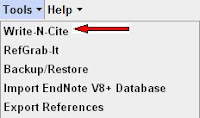
      Write-N-Cite is a utility that formats in-text citations and bibliographies. The Write-N-Cite plug-in inserts tags for your citation into your document as you type. Once you have saved and named the document, you need only choose your ciation style and click Create. The formating is completed quickly. To use Write-N-Cite you must first download the Write-N-Cite utility from the Tools pull-down menu. This plug-in is compatable with both Windows and Macintosh applications.

      RefWorks is an extremely useful database for student and faculty research. Take advantage of the tutorials and guides mentioned earlier, and expect a bit of a learning curve when first using RefWorks. Check out our new RefWorks Resource Guide.


      [FIND RefWorks in our "Databases by Subject" List within any of the first five categories].


      Monday, August 25, 2008

      Database Alert: IE 7 Causes Scary Warnings and Blocked Connections

      Library database access is a fairly sophisticated process involving several systems and applications working in harmony together. Unfortunately, some harmony is hard to achieve--especially with the constant changes with both databases and browsers. We have discovered some issues with database access related to Internet Explorer 7, the latest upgrade to the most popular web browser.

      The problem appears related to IE7 balking when a library user tries to access a database through the proxy server--and all of our database run through the proxy. (The proxy server is the library tool that allows you to be authenticated as a Suffolk user and then allows you to be referred into the database, off- or on-campus.)

      Since the "security certificate" of the database belongs to the database company, it doesn't include the parts of the URL (or web address/link) that sends the connection through the proxy. Therefore, IE7 throws up a "Danger, Will Robinson!" message that can either frighten the library user, or in some cases, actually interfere with your access to the database.

      Right now, we know that this happens when JSTOR users try to access their MyJSTOR accounts. (In this case, you just get a scary warning.) It also happens in Country Commerce, where the warning screen actually interferes with your successful login to the database.

      Here is the problem and how to solve it:

      If I try to access Country Commerce using the standard installation version of Internet Explorer 7, I first get this scary screen, when it tries to connect:


      IE7 thinks it is doing you a favor by telling you not to attempt to connect to the next page. If you click the Continue to this website (not recommended) option, in Country Commerce, the referral will fail and you will not get into the database. Instead, you'll reach the site, but it will demand that you "login." As in this screenshot:


      Since we do not use database manual logins, you would not be able to access the database.

      What you need to do, to not face this issue, is to tell IE7 that it doesn't need to worry about website security certificates and whether they seem to match.

      To adjust this setting. Look at the top menu settings on your Internet Explorer 7 browser. Choose the Tools option

      Then click on the bottom Internet Options

      Click on the far right Advanced tab. And then scroll to the bottom

      UNclick (remove the check mark) in the box that reads "Warn about certificate address mismatch."

      Then click the Apply button at the bottom, and then the OK button at the bottom.

      See, too, the starred note at this option. It indicates that this change will not go into effect until you restart (close and re-open) your IE7 browser.

      This adjustment should allow you to turn off the scary warnings in some databases and avoid the interference that occurs in others.

      We are in contact with our database vendors about this issue, but this is a work-around that will alleviate the problem, for now.

      Friday, August 8, 2008

      New Database: PsychiatryOnline


      Sawyer Library has just added another specialized database--one that will be especially useful to psychology researchers. It is PsychiatryOnline, and it is a product of American Psychiatric Publishing, Inc. (APPI).

      The APPI self-describes their aggregate as "a powerful web-based portal that features DSM-IV-TR®—the most widely used psychiatric reference in the world—and The American Journal of Psychiatry as the cornerstones of an unsurpassed collection of psychiatric references from American Psychiatric Publishing."

      A key selling point is the easy access to the key diagnostic reference set, the DSM® Library. Titles including DSM-IV-TR, DSM-IV-TR Handbook of Differential Diagnosis, and DSM-IV-TR Casebook and its Treatment Companion.

      The database also includes several valuable journals, including the American Journal of Psychiatry and the Journal of Neuropsychiatry and Clinical Neurosciences. Five peer-reviewed psychiatry journals are in the set, with ten years of backfile. (Be advised that some "deep" backfile issues are not available as part of this database.)

      Respected "textbooks" (of the reference variety) are also available on the platform. These include The American Psychiatric Publishing Textbook of Psychiatry, Gabbard’s Treatments of Psychiatric Disorders and Essentials of Clinical Psychopharmacology.

      PsychiatryOnline does not work that well as a searchable database. Instead of allowing a simple keyword or boolean word combination search the way most databases do, it wants your research to match PsychiatryOnline's own controlled vocabulary, or "index entries." This can be inconvenient, but does work. When you click on a subject term, it will default to giving you book content. But in the grey frame to the left, you will see a link to Journal Results.

      This is often a large number of results, since the subject terms are broad. You can limit the term to the title or title and abstract of articles using radio buttons below. Or you can limit to specific APPI journals, or limit for date (perhaps only articles published in the last two years).

      They describe their quirky search engine at this link.

      The good news is that PsychiatryOnline is less about having a searchable database than it is having reliable electronic access--24/7 for anyone with a valid, current Suffolk ID--to several key psychiatry resources. We hope that you find this content useful.

      [FIND The PsychiatryOnline on our "Databases by Subject" List in the "
      Social Sciences" category.]